
How to Use AI for UX Research: Build an AI-Supported Analysis Workflow
How to Use AI for UX Research: AI Tools Are More Powerful With Structure
True, the "insights" these produce often feel inaccurate, or just... off.
Most often, the problem is not that AI as such just cannot do this work. In reality, an LLM is a tireless pattern-detection machine that can do weeks of analytical labor in just minutes.
The problem is that the AI-enabled research repository tools many of us are using aren't built to guide us through the work of qualitative analysis. And for many of them (not naming any names), the AI features are integrated in a way to be showy and drive higher prices, not in a way that actually aids analysis.
For example, having automated, AI-generated summaries appear as you are digging in to do some coding could, depending on your process, steer your analysis off course before it even starts.
The AI features in UX research software are often built in a way that encourages you to skip steps: to accept a summary of your data as an "insight" and call it a day. Of course we'd end up rejecting this output.
The philosophy we bring to our UX research training is that the solution here is NOT to throw out the tools. It's for the researcher to impose the right process on the tool, rather than vice-versa. As we explain in our guide to UX research methods, the researcher's initial judgment on what question to ask, and what method best answers that question, needs to take absolute priority over the choice of tool.
Or, in the words of a character in Douglas Adams's The Hitchhiker's Guide to the Galaxy, "Ok computer, I want full manual control now."
Qualitative Analysis is Structured Transformation
On some level, we want them to be able to walk straight from our data to illuminating insights. It would save us a lot of work. But that violates the fundamental nature of qualitative analysis, which is the act of systematic demolition and rebuilding. You cannot break something down and build it up again in the exact same gesture.
"Analysis" is from the Greek "ana" which means "throughout," and "lysis" which means "breaking up": you are breaking apart something that had been whole. This is followed by "synthesis" of the parts into something new.
At each stage, a transformation occurs.
You start with a transcript that is held together temporally. Its organizing principle is simply time.
When you code (or "tag"), you are breaking out of time, and organizing based on similarity of meaning.
Why LLMs Need Structure
The limited token budget is also one of the reasons LLMs hallucinate. When faced with a lot of textual data at once, they will "forget" earlier data, which means the summaries or generalizations they produce will not represent it.
Breaking down your analysis into discrete steps across multiple prompts gives you several key advantages.
- It reduces error propagation. When you ask for everything at once, an early misstep like misidentifying a key theme cascades through the entire analysis.
- You gain greater control to review intermediate outputs and adjust your approach, just like you would in manual analysis. If the initial codes aren't quite right, you can refine them before moving to synthesis.
- You get its full attention budget. By isolating each analytical operation into its own prompt, you allow the model to dedicate its full token budget to that specific task, the same computational resources that would be split five ways in a complex prompt can now focus entirely on one task.
The Power of Sequential Prompts
Step 1: "Read these three interviews and pull out any mentions of frustration with our product."
Step 3: "Looking at group 1, define the specific frustration theme for this group?"
Each interaction becomes a focused micro-task where the model can dedicate its full processing power to one type of thinking at a time.
This is what I call the Strategic Partner model as a way of integrating AI in UX research: you are the leader who decomposes the research process into clear, sequential steps (read and extract, then categorize, then interpret) and assigns out tasks based on the strengths and weaknesses of your partners.
The AI UX Research Paradox: Structure = Speed
When given structure, you gain the strength of AI tools and mitigate the weaknesses. These strengths include:
- Complete lack of fatigue
- Pattern detection that works differently from your brain, adding a fresh perspective on the data
- Ability to look at a very large dataset all at once
Define Your Qualitative Analysis Workflow
Logical connection between data and insight is what separates the professional researcher from the amateur
That's not qualitative research. That's mere information.
Remember, qualitative research, like all research, is transformation: it produces a new thing (knowledge) that was latent within the raw data but not at all obvious on the surface. So it achieves something significant: a claim that appears as new but is also systematically grounded in the "old" data.
To produce a new insight requires multiple moments of transformation, a path that leads away from the verbatim text in front of you, but retains a firm logical connection to it.
The path from data to insight
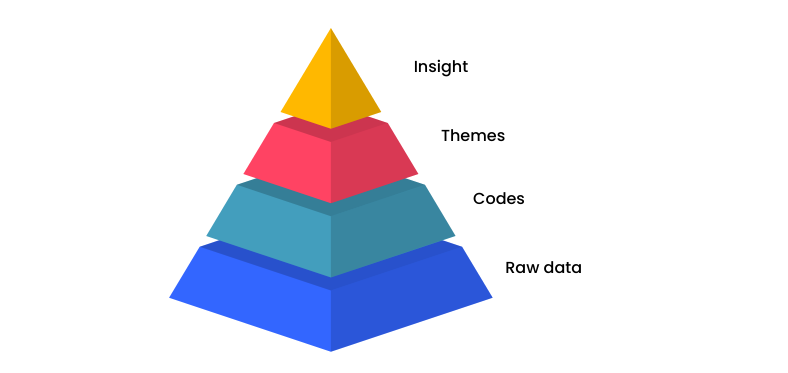
Planning a workflow entails deciding how to get from raw data to insights, what steps to invest more and less time in given your objectives and timeframe, and who does what task, including what human researchers and what AI tools.
One way of conceptualizing this set of decisions is to think of the AI tools as strategic partners who have strengths and weaknesses, just like any human member of your team.
Thematic Analysis Workflow Steps
1. Study design
This is the moment where you choose theoretical framing. In UX research, theory is rarely chosen consciously, but it matters. If you're looking at your subject through a sociological lens, you will end up with a very different dataset than if you think through HCI.
Your methods embody epistemological commitments. Choosing interviews assumes people can articulate their experiences; choosing embodied forms of inquiry suggests that practices and tacit knowledge matter more than what people say. Each method grants you access to different types of data and therefore different analytical possibilities.
The sampling and data collection create your analytical boundaries. You can't analyze what you haven't collected. If you never asked about family dynamics, you can't suddenly "discover" their importance later. The gaps in your design become permanent blind spots in your analysis.
This is why experienced qualitative researchers often revise their research questions after initial data collection, adjust their sampling strategy when early analysis reveals unexpected patterns, or add new interview questions mid-study. They recognize that design and analysis are iterative and inseparable: each informs the other throughout the research process.
AI Opportunities for Study Design
Literature synthesis and theoretical exploration. AI can help you envision all the possible study designs you might consider, by rapidly scanning vast bodies of literature to identify how other researchers have approached similar concepts, what methods they used, and what they found.
Research question refinement: AI can push back on vague or overly broad questions. Feed it your draft research questions and ask it to identify assumptions, suggest how different phrasings would shift focus, or generate alternative framings from different theoretical traditions.
Anticipating analytical pathways. Before collecting data, AI can help you think through how specific study designs will collect different data. This prospective thinking helps ensure your design aligns with your analytical ambitions.
2. Script Design
- the type of interview you conduct (unstructured, semi-structured, etc.)
- the sequence or structure of your questions.
Your choices on both of these will radically determine what is possible in your analysis and the amount of effort you need to invest.
For example, if you choose a truly open-ended interview style, you are likely to gain very rich, detailed data. You're not constantly steering participants back to your questions, you're allowing them to follow their own train of thought and to exhibit their own mental models.
But the cost of this approach at the analysis stage will be much greater. You'll have to work much harder at finding order in the data, because no two interviews are likely to follow the same sequence. One might address topic A at the beginning, another will address it at the end.
Make these decisions based on your study goals. Do they require the richness that comes from being open-ended, or does the scope of your questions need to be more defined?
Making this decision early on will determine how much effort you have to spend on analysis before your participants have even spoken a single word.
AI Opportunities for Script Design
Pilot interview tester. While a real pilot interview is always the best way to test how your questions perform, not all projects have room for this step. Prompting an AI chatbot to behave as a participant with a specific role, like "tech-resistant high school teacher," will let you test if your questions produce the kind of data you need.
4. Recording Method
AI Opportunities for Recording
5. Data Prep + Cleaning
Transcription tools are improving, but still not perfectly reliable.
Perhaps the best use of AI is to help flag potential errors.
AI Opportunities for Data Prep + Cleaning
Sample Prompt: "Review this transcript for likely transcription errors. Pay special attention to [medical terminology/education jargon/whatever your domain is]. Flag homophone errors, misheard technical terms, and invented proper nouns. Suggest corrections but let me approve them."
Pre-categorizing transcript segments. AI tools are extremely adept at creating topic sections in transcripts. This pre-analytical step makes it easier for human researchers and AI tools to code more quickly. You can prompt them to create these sections in the text, as a table of contents with timestamps, or both.
Sample Prompt: Create a topic index for this transcript. Every time the conversation shifts to a new topic, note the approximate location and topic.
Checking accuracy by looking for logical inconsistency (Experimental). When asked to check for errors, LLMs might not notice crucial missing words. Another approach is to instruct them to look for utterances that are semantically inconsistent with the surrounding context, and follow up on these.
Sample Prompt: Review this transcript and flag any sentences or passages where the speaker seems to express contradictory or logically inconsistent meaning. Look for:
- Direct contradictions within the same sentence
- Semantic confusion that suggests missing or misheard words
- Statements that don't make logical sense given the surrounding context
For each flagged instance, explain what seems inconsistent and suggest what might have actually been said.
6. Coding (Tagging)
This is where the real analytical work begins. Coding is the process of systematically labeling segments of your data according to what they represent. You're essentially creating a new organizational system based on meaning rather than chronology.
There are different approaches to coding:
Inductive coding starts from the data itself. You read through transcripts and generate codes based on what you actually see, without predetermined categories. This is ideal when you're exploring unfamiliar territory or want to let unexpected patterns emerge.
Deductive coding starts with a predetermined framework or set of codes derived from theory, prior research, or your research questions. This works well when you're testing specific hypotheses or working within an established conceptual model.
Hybrid coding combines both approaches. You might start with some anticipated codes but remain open to new ones that emerge from the data.
The complete coding process typically happens in waves:
- First pass: Generate initial codes freely, staying close to the data
- Refinement: Consolidate similar codes, split overly broad ones, clarify definitions
- Application: Systematically apply your refined codebook to all data
- Iteration: Adjust as needed when codes don't fit well or new patterns emerge
Types of Codes in Qualitative Research
In vivo codes
Descriptive codes
Process codes
Emotion codes
Values codes
Theoretical codes
Structural codes
AI Opportunities for Coding
Initial code generation. AI's pattern-recognition strength can rapidly suggest potential codes for your data, giving you a starting point that you can then refine based on your deeper understanding of the context.
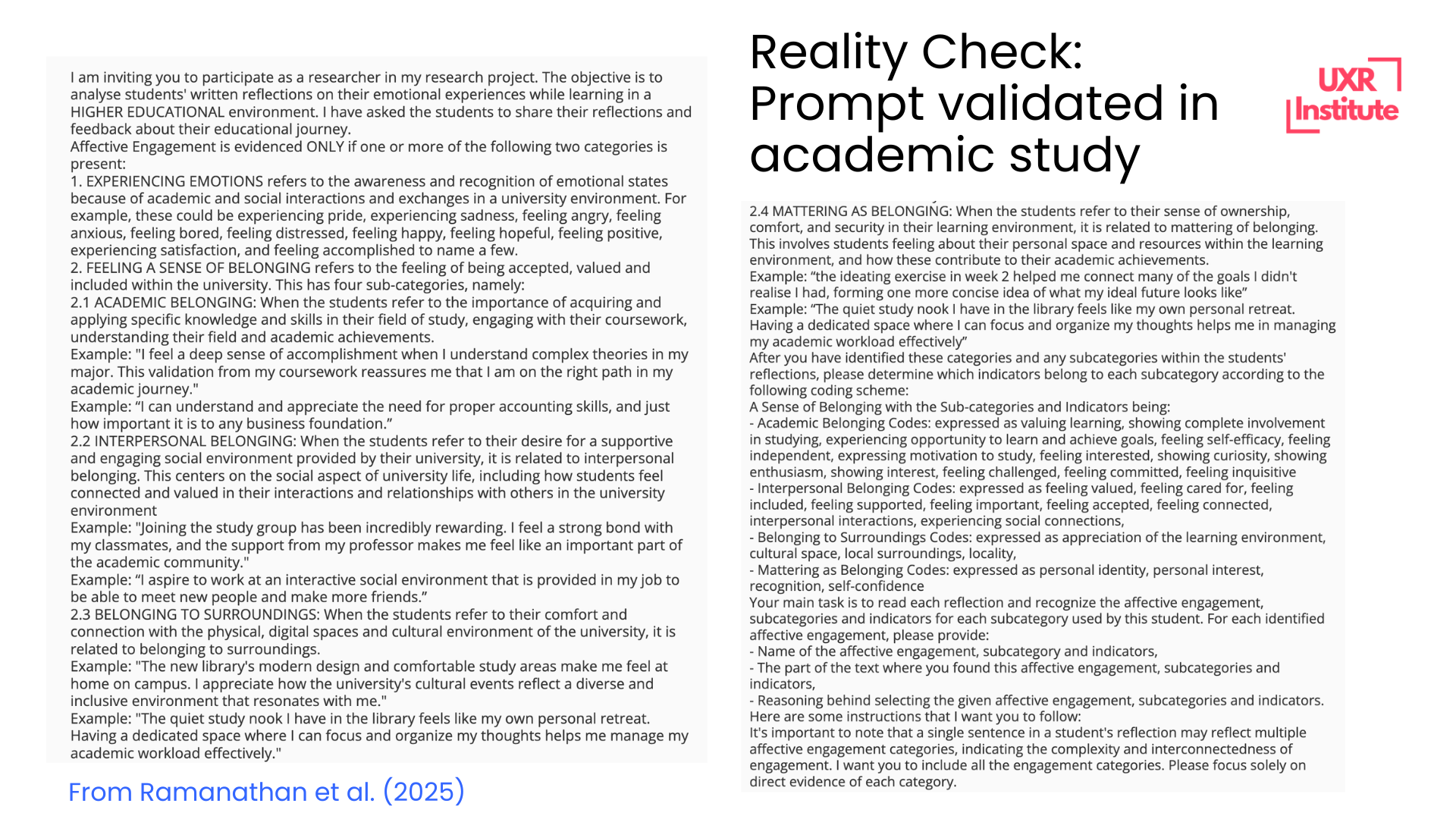
Sample Prompt: "Read this interview transcript and suggest 15-20 potential codes that capture the key concepts, experiences, and themes mentioned. For each code, provide a brief definition and 1-2 example quotes."
Codebook assistant. Creating codebooks is essential when multiple people are coding. AI can help craft the detailed examples (including boundary cases) that will help both human coders and the AI itself with the coding process.
Sample Prompt: "Here are 10 segments I coded as 'workflow disruption' [paste segments]. Which 2-3 would serve as the clearest examples to include in my codebook? Explain why these are good exemplars."
Deductive coding assistance. AI can help apply codes across large amounts of data. To do this decently well, it needs (1) a detailed codebook with examples, and (2) to handle data in chunks. Due to token limits, it is unwise to upload a large amount of text at once. But with these caveats, it will be an effective partner.
Sample Prompt: "Here is my codebook with definitions [paste codebook]. Now code this transcript using only these codes. For each coded segment, indicate which code(s) apply and explain why briefly."
Consistency checking. AI can identify where you might have applied codes inconsistently across your dataset.
Sample Prompt: "I coded these five segments with 'time pressure' [paste segments]. Are these uses consistent? Are there any that seem to be capturing something different?"
7. Norming for Inter-coder Reliability
When using an AI tool for coding, you should also consider it as one of your coders, who should be tested against you and the other human coders on the team. Comparing the AI's work against yours will help you understand
Remember, with chatbot-style tools, your prompts play a very large role in the reliability of the tool's work. So at this testing phase, you're not just testing the tool; you should also test to see whether better prompting produces better results.
The typical process:
- Independent coding: Each coder codes the same sample of data independently
- Comparison: Calculate inter-coder agreement (how often coders assigned the same codes)
- Discussion: Talk through disagreements to understand why they occurred
- Refinement: Clarify code definitions, add examples, adjust boundaries
- Re-test: Code another sample independently to see if agreement improved
AI Opportunities for Inter-Coder Reliability
Simulated second coder. While AI shouldn't replace a human second coder for high-stakes research, it can serve as a useful check on your coding logic, especially when resources don't allow for true inter-coder reliability testing.
Sample Prompt: "Here is my codebook [paste codebook]. Code this transcript segment using these codes. I'll compare your coding to mine to see where we agree and disagree."
Code definition examples generator. Strong inter-coder reliability requires clear examples in your codebook. AI can help identify the best exemplar quotes.
Sample Prompt: "Here are 10 segments I coded as 'workflow disruption' [paste segments]. Which 2-3 would serve as the clearest examples to include in my codebook? Explain why these are good exemplars."
8. Reflection, aka, Memo Writing
No matter what form they take, moments of reflection are essential. They make the difference between forgettable insights and real show-stoppers. There are much faster, lighter versions of this that work well in applied research contexts:
- Voice notes recorded immediately after interviews
- Quick bullet points in your research log
- Annotations directly in your transcript margins
- Team debriefs captured in a shared document
AI Opportunities for Reflection or Memo-Writing
Structured reflection prompts. AI can serve as an interactive journaling partner, asking you probing questions about what you're noticing in your data. This is particularly useful when you're stuck or feel like your thinking has gone flat.
Sample Prompt: "I just finished coding three interviews about healthcare workers and burnout. Ask me five reflective questions that will help me think deeper about what I'm seeing in this data. Focus on patterns, contradictions, and assumptions I might be making."
Synthesis of scattered notes. If you've been jotting down observations across multiple interviews, AI can help you organize these into coherent memos that reveal emerging themes.
Sample Prompt: "Here are my post-interview notes from five sessions [paste notes]. Help me organize these into 3-4 coherent reflection memos. Group related observations together and highlight where I'm seeing contradictions or tensions."
Challenging your interpretations. Ask AI to play devil's advocate with your emerging ideas. This helps you stress-test your thinking before you've gone too far down an analytical path.
Sample Prompt: "I'm starting to think that [your emerging interpretation]. What are three alternative explanations for this pattern? What evidence would contradict this interpretation?"
9. Theme Development
Codes are the raw materials. Themes are what you build from them.
Moving from codes to themes requires a conceptual leap. You're no longer just labeling what's in the data—you're articulating patterns of meaning that run through the data. Themes answer the question: "What is this really about?"
A theme is not just a category or a topic. It's an explanation that captures something significant about the data in relation to your research question. Themes should be:
- Patterned: They appear repeatedly across your data
- Meaningful: They say something important about your research question
- Distinct: They're clearly differentiated from other themes
- Coherent: The codes grouped under them fit together logically
The process of theme development:
- Grouping codes: Look for codes that seem to belong together
- Identifying patterns: What connects these codes conceptually?
- Naming themes: Create a name that captures the essence of the pattern
- Testing fit: Do all the grouped codes really belong in this theme?
- Refining boundaries: Where does one theme end and another begin?
Expect to iterate. Your first attempt at themes won't be your last. You might merge themes that are too similar, split themes that are trying to do too much, or reorganize codes when you realize they fit better elsewhere.
AI Opportunities for Theme Development
Pattern identification across codes. AI can help you see connections between codes that might not be immediately obvious.
Sample Prompt: "Here are my 25 codes with quotations related to each [paste codes + quotations]. Suggest possible groupings that could form coherent themes. For each grouping, explain what conceptual thread connects these codes."
Theme naming workshop. Sometimes the hardest part is finding the right name for a theme, one that's both accurate and evocative.
Sample Prompt: "I have a theme that includes these codes: [list codes]. The theme captures how users create unofficial systems to compensate for software limitations. Suggest five possible theme names, ranging from descriptive to more conceptual."
Theme refinement through challenge. Ask AI to pressure-test your themes by identifying weak spots or contradictions.
Sample Prompt: "I've developed this theme: [describe theme]. Here are the codes included: [list codes]. What codes seem like they don't quite fit? What's missing that would make this theme more coherent?"
10. Theme Validation + Refinement
For higher-stakes or more complex projects, you'll want to pressure-test your themes against your data before going any further, and use any discrepancies to refine your themes further.
You can also use this step in fast-moving projects where you may have done minimal or no coding, and skipped to themes right away. This validation step will act as insurance policy against your speed.
Validation involves:
Checking representativeness: Does this theme appear across multiple participants/data sources, or is it based on one particularly quotable person?
Testing boundaries: Can you clearly articulate what falls inside vs. outside this theme? If everything could fit, your theme is too broad.
Examining negative cases: Are there instances in your data that contradict this theme? If so, does that invalidate the theme or help you refine it?
Ensuring distinctiveness: Are your themes clearly different from each other, or do they blur together in confusing ways?
Connecting to research questions: Does this theme actually help answer your research questions, or is it just interesting but tangential?
AI Opportunities for Theme Validation + Refinement
Negative case identification. Prompt the AI to conduct what's called "negation coding," basically finding examples that contradict the theme(s).
Sample Prompt: "My theme is: [describe theme]. Search through these transcripts [paste data] and find any instances that contradict or complicate this theme. What am I missing?"
Cross-participant validation. Check if your themes truly span your dataset or are driven by a subset of vocal participants.
Sample Prompt: "I have five themes [list themes]. For each theme, analyze how many participants contributed data to it and identify any themes that are dominated by just 1-2 participants."
11. Insight Synthesis and Storytelling
Insight synthesis is where you connect themes to each other and to your research questions to tell a coherent story. You're answering: "What does this all mean for the product or business decision we're trying to inform? So what?"
Strong insight synthesis:
- Reveals relationships: How do multiple themes interact, contradict, or reinforce each other?
- Provides context: How do your findings correct or reinforce existing assumptions or knowledge?
- Generates implications: What should stakeholders do with this information?
The shift from analysis to storytelling is crucial. Your stakeholders don't want a list of themes; they want to understand what's happening and why it matters.
This is where you build the "logical connection" we talked about earlier. You're creating a chain of reasoning:
"Here's what people said [data] → Here's what it means [themes] → Here's why it matters [insights] → Here's what we should do [implications]"
AI Opportunities for Insight Synthesis and Storytelling
Relationship mapping. AI can help you visualize and articulate how themes connect to each other.
Sample Prompt: "I have these four themes: [list themes]. How might they relate to each other? Are some themes causes and others effects? Do any themes exist in tension with each other? Help me map the relationships."
Storyline development. AI can help you experiment with different narrative structures for presenting your findings.
Sample Prompt: "I need to present these themes [list themes] to product leadership. Suggest three different narrative structures I could use. One should be problem-focused, one solution-focused, and one journey-focused."
Implication generation. Move from "what we found" to "what we should do."
Sample Prompt: "Based on these three themes [describe themes], generate five possible product implications. For each implication, explain the logical connection back to the theme."
Compelling framing. Sometimes you need help articulating why your insights matter.
Sample Prompt: "My key finding is [describe finding]. Help me articulate why this matters by: (a) explaining the business impact, (b) connecting it to user outcomes, and (c) framing it as an opportunity rather than just a problem."
12. Reporting and Presentation
The final step is communicating your insights in a way that drives action. Different audiences need different formats:
Executive summaries: High-level findings and implications, minimal methodology
Detailed reports: Full analytical journey, supporting evidence, methodology
Slide decks: Visual, punchy, story-driven
Research repositories: Tagged, searchable, reusable for future projects
The common mistake is treating reporting as separate from analysis. Your choices about how to present insights are analytical choices. What you emphasize, how you sequence information, which quotes you select; all of these shape how people understand your findings.
AI Opportunities for Reporting and Presentation
Multi-format adaptation. Transform your analysis into different formats for different audiences.
Sample Prompt: "Here's my detailed theme write-up [paste content]. Adapt this into: (a) a two-sentence executive summary, (b) a slide title and three bullet points, and (c) a compelling opening paragraph for a report."
Quote selection and editing. Find the most illustrative quotes and edit them for clarity without losing meaning.
Sample Prompt: "I need a quote that illustrates this theme: [describe theme]. Here are five candidate quotes [paste quotes]. Which is strongest and why? Then edit the selected quote for clarity by removing filler words and false starts, but maintain the participant's voice."
Visual concept development. While AI can't create final graphics, it can help you conceptualize how to visualize your themes and recommendations. AI tools can also build prototypes in a fraction of the time; our workshop on AI prototyping using Claude Code shows how to use skills in Claude to quickly create visual concepts.
Sample Prompt: "I have these three interrelated themes [describe themes]. Suggest three ways I could visualize their relationships. Consider diagrams, journey maps, or other visual formats."
Bringing It All Together: Your AI-Supported Analysis Workflow
Remember the core principles:
- Sequential prompts over single mega-prompts: Break analysis into discrete steps
- Human judgment at decision points: AI suggests, you decide
- Transparency in your process: Document what AI did and what you did
- Validation at every stage: Don't blindly accept AI outputs
When you build an intentional workflow that respects the structured transformation of qualitative analysis, AI becomes genuinely useful. It doesn't replace your expertise. It amplifies it.
The result is faster analysis, but it could also be more rigorous, more transparent, and, believe it or not, even more trustworthy.
Interested in building your own workflow with guidance? Check out our course, which will guide you through this process:

Stay in the loop